

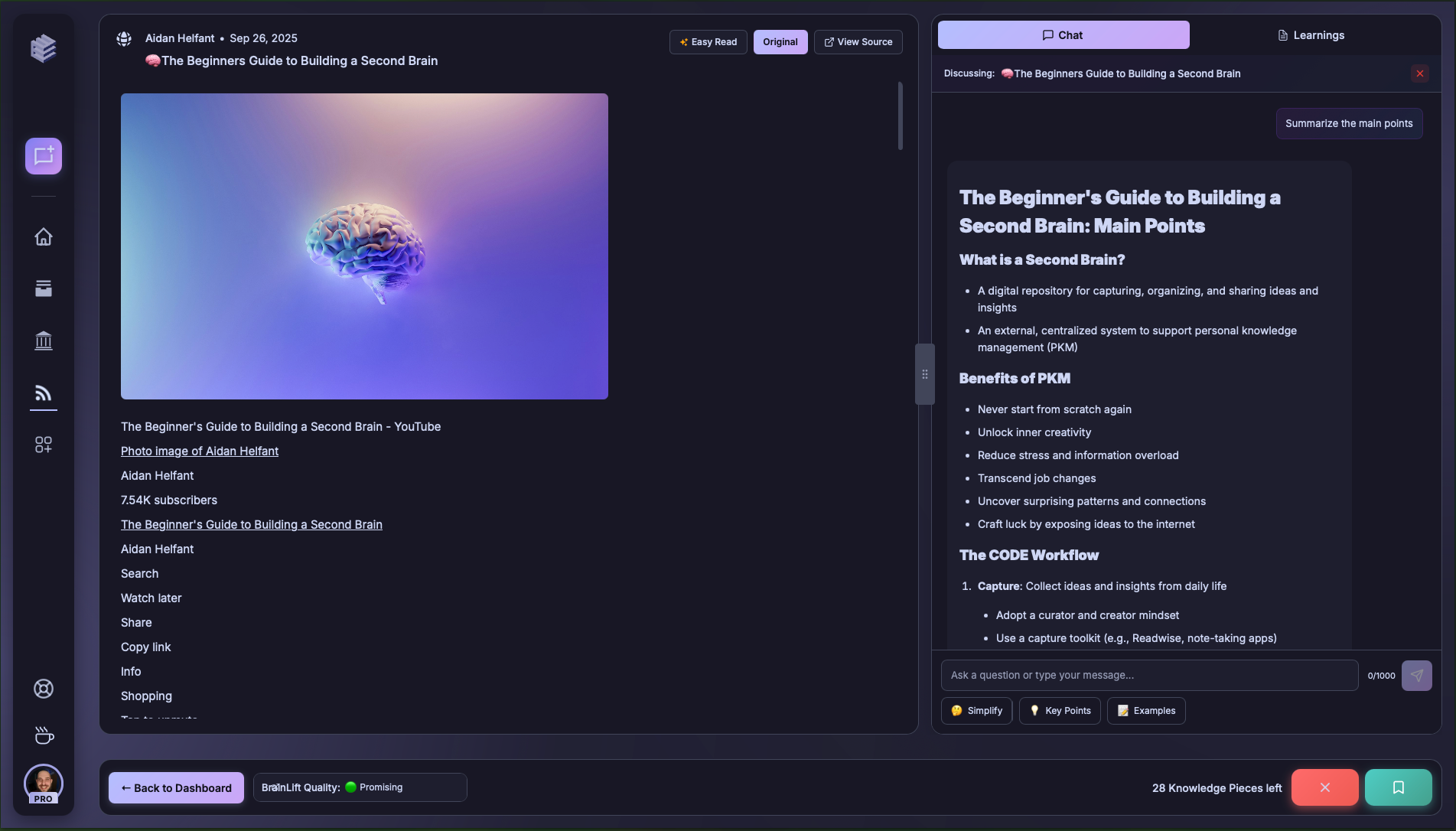
Main Content Area
The central panel presents the content itself (articles, videos, or other resources).- Easy Read mode simplifies formatting for readability.
- Source view lets you reference the original version directly.
Side Chat with AI
On the right, you can collaborate with Ephor to process content:- Summarize – condense into main points.
- Break Down – explain complex ideas.
- Highlight Key Arguments – surface the most important claims.
- Auto DOK Extraction – structured learning outcomes aligned to Depth of Knowledge frameworks.
Treat the side chat like a study partner — ask clarifying questions, request examples, or test your understanding.
Bottom Bar Controls
At the bottom, you decide what happens with the content:- Save / Bookmark – keep for later review.
- Reject / Skip – remove low-quality or irrelevant material.
- Back to Dashboard – exit the current path.
Don’t be afraid to reject irrelevant content. BrainMaxxing works best when it stays sharp and curated.